



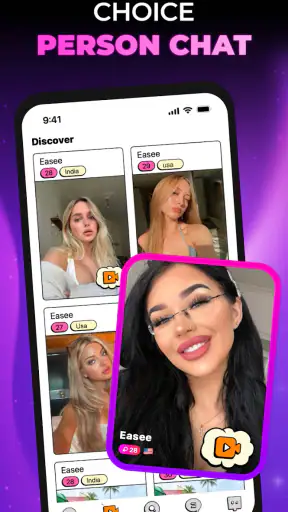

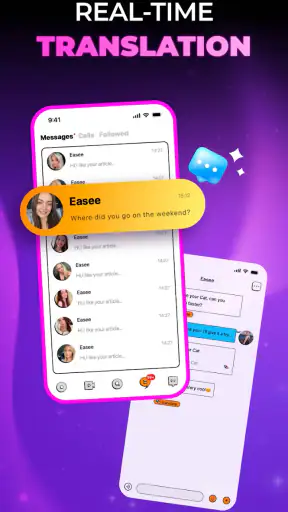

I tried Easee - Share & Chat as a social app built around meeting people and sharing activities, and my first impression was that it aims for a lighter, less formal kind of connection. It is not presented as a work tool, a dating guide, or a traditional messaging replacement. The appeal is simpler: open the app, find someone interesting, start a conversation, and use shared activities to give that conversation somewhere to go.
That sounds straightforward, but social apps live or die by the small decisions around discovery, conversation flow, privacy, and paid extras. Easee is enjoyable when I treat it as a place for casual interaction rather than as a complete social home. I can see why it has attracted more than a million installs and an average rating of 4.3 from roughly 33 thousand ratings, although those figures do not remove the need to decide whether its style suits the way you actually socialize.
How the everyday Easee experience works
The most useful way to approach Easee is to begin with a clear purpose. If I open it expecting an endless, perfectly organized network of close friends, I am likely to find the experience less satisfying. If I use it to make a conversation easier, discover people with similar interests, or turn a quiet moment into a small social activity, its design makes more sense.
My baseline workflow would be simple. I would first look through the available social space without rushing to contact everyone. Then I would choose a few conversations or activities that genuinely interest me. The important habit is to respond to something specific rather than sending a vague opening message. A reference to an activity, topic, or shared interest gives the other person a reason to continue.
This matters because the app’s central promise is not merely chatting. It combines meeting friends with activities, so the conversation has more structure than a blank message screen. For a new user, that structure can reduce the awkwardness of deciding what to say. Instead of trying to create an entire relationship from one greeting, I can use the activity as a natural starting point.
A realistic use case would be a quiet evening when I want interaction but do not want to commit to a large public platform. I might browse for something that matches my mood, join a conversation around it, and return later if the exchange feels comfortable. That is a better fit for Easee than expecting an instant group of close friends after a single session.
Who gets the most from the basic workflow
I think the app is especially suitable for people who enjoy low-pressure social discovery. It can work for someone new to a city, someone looking for casual conversation, or someone who prefers an activity-based opening instead of a direct personal introduction. It may also appeal to users who find conventional social feeds too noisy and ordinary chat apps too empty.
It is less convincing for people who already organize their social life through established communities. If your friends are all on a messaging service, a private group, or a platform built around a specific hobby, moving them to another app may not add much. Easee has more value when you want to meet beyond your existing circle, not when you simply need another place to send messages to people you already know.
The mature age rating is important here. Easee is marked for users aged 17 and over, so I would not treat it as a general-purpose app for younger teenagers. I would also approach conversations with the same care I would use on any service that introduces me to people I do not know. Avoid sharing personal contact details too quickly, keep early conversations inside the app, and leave an interaction if the tone becomes uncomfortable.
What I would do during the first session
During a first session, I would resist the temptation to judge the whole service by the first few profiles or conversations I see. Social platforms can feel empty when used at an unusual time or with overly narrow expectations. I would spend enough time learning how activities and conversations relate to each other, then decide whether the interaction style feels natural.
I would also set a personal limit for notifications. A social app can become tiring when every small interaction demands attention. Even without turning the experience into a rigid routine, checking it at deliberate moments is healthier than opening it whenever I feel bored. This is one of the practical differences between using Easee intentionally and allowing it to become another stream of interruptions.
The app is free to download, which makes trying the core experience easy. However, in-app purchases range from $0.99 to $99.99 per item, so I would not assume every optional element is equally necessary. I would use the free experience long enough to understand what I actually need before spending anything.
Settings and habits that make the experience easier
With a social app, settings are not background details. They shape who can reach me, how often I return, and how much information I expose. I would review the available account, notification, and privacy controls before becoming active. The safest approach is to begin conservatively, then loosen settings only when I understand the community and feel comfortable with the conversations.
Notifications deserve particular attention. I would keep alerts that help me notice a meaningful reply, while reducing anything that encourages constant checking. If the app offers separate controls for different kinds of activity, I would use them to distinguish direct conversation from general updates. That creates a calmer workflow and makes genuine replies easier to notice.
Another useful habit is to keep my profile focused. I would share enough to make conversation possible, but not so much that a stranger can quickly build a detailed picture of my routine, location, workplace, or personal contacts. A short description of interests is more useful than a complete biography. It gives people an opening while preserving room to learn about each other gradually.
The best setting is the one that supports deliberate contact rather than constant exposure. That principle is more valuable than turning every option on or off automatically. Easee is designed for social discovery, but discovery works better when I control the pace and the amount of personal information visible at the beginning.
Making activities work as conversation prompts
The activity side of Easee is where I would try to get more value than I would from a basic chat list. Instead of treating activities as decoration, I would use them as filters for attention. When something catches my interest, I would ask myself whether I am genuinely willing to discuss it or participate around it. That small check prevents me from starting too many shallow conversations.
A practical pattern is to choose one activity as a short-term social focus. I might return to it later, see whether the same conversation has developed, and contribute something specific. This is more manageable than trying to maintain a large number of contacts at once. It also gives the interaction continuity, which casual social apps often lack.
There is a trade-off, though. Activity-based discovery can make starting a conversation easier, but it may also narrow the interaction around the activity itself. If the other person is not interested in moving beyond that topic, the connection may end quickly. I would not interpret every short conversation as a failure; sometimes the app is useful precisely because it enables a brief, pleasant exchange without demanding a long-term friendship.
A repeatable routine for people who dislike social clutter
Experienced use does not require spending hours inside the app. I would create a repeatable routine: check for replies, review a small number of relevant activities, answer conversations that feel worthwhile, and leave the rest alone. The goal is not to maximize the number of interactions. It is to improve the quality of the few interactions I choose.
This routine also helps with emotional expectations. If I measure success by the number of new contacts, the experience can become competitive and disappointing. If I measure it by whether I found one enjoyable exchange or discovered one activity worth revisiting, the app feels more useful. That is a better match for Easee’s casual character.
I would also avoid opening conversations with demands for immediate personal details. A slower exchange gives both people a chance to see whether the tone is respectful. If a conversation becomes repetitive, I would either steer it toward the activity that brought us together or end it politely. That keeps my social space manageable and avoids collecting contacts I never intend to revisit.
Faster patterns without turning socializing into a task
Easee becomes more efficient when I stop treating every screen as an invitation to interact. I can scan with a purpose, choose a small number of promising activities, and return to conversations that already show some mutual interest. This is faster than repeatedly starting from scratch, and it creates a more coherent experience.
One useful pattern is the “specific reply first” approach. Rather than beginning with a generic greeting, I respond to the visible subject of the activity or conversation. This reduces the burden on the other person and quickly shows whether we have anything in common. It also helps me avoid spending time on exchanges that have no clear direction.
A second pattern is to separate discovery from conversation. I would browse when I have the patience to explore, then chat when I can give the exchange proper attention. Mixing both constantly can make the app feel busy without producing better connections. Separating the two modes gives me a clearer reason for opening it each time.
A third pattern is to use short sessions. Social discovery does not always improve with longer scrolling. After I have found a few relevant activities or answered current replies, continuing to browse can produce diminishing returns. Leaving at that point protects the sense that the app is a useful tool for connection rather than an obligation.
Where Easee differs from familiar social alternatives
Compared with a standard messaging app, Easee is better suited to meeting people outside an existing contact list. A messaging app is usually strongest once I already know whom I want to contact. Easee starts earlier in the process, when I am looking for a reason to begin. That makes it more exploratory, but also less predictable.
Compared with a large social network, it feels more focused on direct interaction and shared activities than on following a broad public feed. The advantage is less pressure to perform for a large audience. The disadvantage is that the experience may depend more heavily on whether I find activities and people that match my interests at the moment I use it.
Compared with a hobby-specific community, Easee is more general. A specialized forum or group will usually offer deeper knowledge and stronger continuity around one subject. Easee is preferable when I want variety and informal introductions. If my main goal is expert discussion about a narrow interest, I would choose the dedicated community instead.
The comparison with dating-oriented apps is also worth making. Easee’s social framing makes it more appropriate for people who want friendship or casual interaction without making romance the assumed purpose. That can feel more comfortable, but it also means I should communicate my intentions clearly rather than expecting the app to define them for me.
Handling purchases and expectations
Because the app is free with optional purchases, I would treat paid items as conveniences rather than a requirement until the free workflow proves useful. The broad purchase range means a small trial and a large commitment are very different decisions. I would never buy simply because a prompt creates urgency; I would first identify the exact problem the purchase is supposed to solve.
This is particularly important in a social app because paid options cannot manufacture genuine compatibility. They may improve access or convenience, but they cannot guarantee a respectful conversation or a lasting friendship. My advice is to judge the quality of the people and activities available before judging whether an optional purchase is worthwhile.
Easee is currently at version 1.1.8 and supports devices running Android 7.0 or later. That gives the app a broad technical reach, although compatibility alone does not tell me whether it will feel equally smooth on every device. I would keep the app updated through the normal store process and pay attention to how it behaves on my own phone rather than assuming another user’s experience will be identical.
Advanced limits that experienced users should understand
The biggest limitation is inherent to social discovery: the app can provide a place to meet people, but it cannot guarantee that the available conversations will match my personality, schedule, or expectations. A strong first session may be followed by a quiet one. I would see that variation as part of the format rather than as proof that the app has suddenly stopped working.
There is also a tension between openness and safety. The more broadly I search for new people, the more likely I am to encounter conversations that are irrelevant, uncomfortable, or simply inactive. Tightening my behavior helps: I can choose activities carefully, avoid oversharing, and stop replying when the exchange no longer feels right. Those habits are more dependable than expecting an app to remove every awkward interaction.
Another limit is continuity. A shared activity can start a conversation, but it does not automatically create a lasting social group. If I want a stable community with archives, organized topics, or long-running collaboration, a dedicated group platform may serve me better. Easee is strongest at the beginning of a connection, not necessarily at managing every stage that follows.
I would also skip it if I dislike meeting strangers online, need professional networking tools, or want a highly moderated environment for a narrow age group. The mature rating alone does not make every interaction suitable for every adult, and the general social focus may feel too open-ended for someone seeking a tightly defined purpose.
Privacy-minded use without losing the social benefit
I would keep early conversations general and avoid sharing a phone number, home address, workplace details, financial information, or travel plans. If someone pushes for those details before trust has developed, that is a reason to slow down or end the exchange. The ability to meet new people is useful only when I retain control over what I reveal.
I would also be careful with images and activity descriptions. Even ordinary details can become identifying when combined. Mentioning a broad interest is usually enough to begin; I do not need to provide a precise routine or location to make a conversation possible. This is a practical way to preserve the app’s social benefit while reducing unnecessary exposure.
For parents or guardians deciding whether the app is appropriate for someone else, the age rating should be treated as a firm boundary rather than a suggestion. For adults, the same information is a reminder that the tone and audience may not resemble a child-friendly messaging service. I would use the app with adult judgment, especially when moving from public discovery toward private conversation.
Recognizing when to move on
A good social habit is knowing when an interaction has reached its natural end. If a conversation is one-sided, repeatedly evasive, or uncomfortable, I would not keep investing effort just because it began through an activity I liked. I can return to discovery and choose a different exchange. That flexibility is one of the reasons not to become overly attached to any single contact.
Likewise, if I find myself checking the app without enjoying the conversations, I would take a break instead of forcing a routine. Easee should add opportunities for connection, not become a test of endurance. The app’s free access makes it easy to return later, so there is little reason to keep using it during a period when it is not meeting my needs.
My verdict after using Easee with a deliberate approach
I see Easee as a friendly social discovery app with a clear practical strength: activities give conversations a starting point. That makes it more approachable than an empty chat screen and less performative than a broad public feed. The experience works best when I use it selectively, keep my profile measured, and judge success by meaningful exchanges rather than by volume.
Bonbon Team has positioned the app as a free social experience, and its scale suggests that many people are willing to try this approach. The 17-and-over rating, optional purchases, and general-purpose audience also tell me to use it thoughtfully rather than treating it like a universal community space. It is not the right replacement for a private messenger, a specialist forum, or a structured professional network.
My strongest recommendation is for adults who want casual introductions and activity-led conversation. I would suggest starting free, checking the notification and privacy controls, choosing only a few relevant activities, and giving each promising conversation enough attention to see whether it develops. Those steps reveal the app’s real value more clearly than rapid browsing.
I would skip it if I need guaranteed activity, deep subject expertise, or an established group of people I already know. For everyone else, Easee is worth trying with realistic expectations. It is most rewarding when used as a doorway to conversation, not as a complete substitute for every social space.
After version 1.1.8, my overall view is positive but measured. The app is easy to understand, free to begin, and distinctive enough to stand apart from ordinary chat tools because shared activities help break the ice. Its limits come from the same open-ended design that makes it appealing. With sensible boundaries and a repeatable, low-pressure routine, I would recommend giving it a chance.


